ArtCraft: The Open-Source AI Image & Video App, Explained.
ArtCraft is the viral desktop AI app designed specifically for artists, designers, and animators. Run state-of-the-art diffusion and motion synthesis 100% locally on your own GPU—free forever, zero cloud subscriptions, zero corporate lock-in.
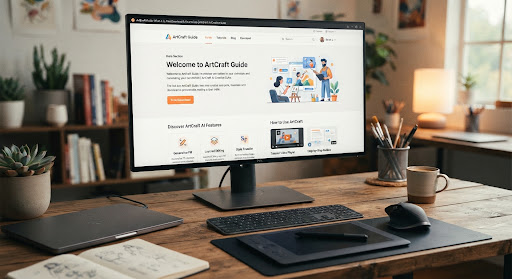
What is ArtCraft, and Why Did It Blow Up on GitHub?
Unlike cloud-tethered web apps that bill you $0.04 per prompt, ArtCraft compiles state-of-the-art generative pipelines directly into an ergonomic, native desktop software client.
Local Model Inference
No throttled server queues or surprise subscription upgrades. ArtCraft leverages your physical GPU (NVIDIA Tensor Cores or Apple Metal Shaders) to execute SDXL, Flux, and LoRA checkpoints locally in milliseconds.
Open-Source Foundation
Full pipeline transparency under permissive open-source licensing. Swap out foundational checkpoints, mount custom fine-tuned weights, or build headless automated Python plugins without commercial API restrictions.
Created by Brandon Thomas
Initiated by Brandon Thomas alongside over 180 international open-source contributors. The project was built to bridge the gap between chaotic node spaghetti (like raw ComfyUI) and professional desktop software standards.
Three Steps from Zero to First Render
You don't need a PhD in PyTorch or command line mastery. Follow this straightforward setup path to launch your local creative environment in minutes.
Check System Hardware
ArtCraft executes deep learning weights directly in VRAM. Ensure your workstation meets minimum target thresholds for seamless performance:
Download Official Release
Obtain the pre-compiled installer package for your operating system directly from verified releases. Zero manual environment compilation required.
Launch Local Studio
Open the ArtCraft client. The built-in Model Manager automatically downloads the optimized starter weights (PhotoCraft SDXL Fast or VectorCraft v1.2) into your local cache.
Integrated Creative Engines
ArtCraft merges multiple generative disciplines into a unified visual canvas, removing friction between raster editing, vector authoring, and video motion.
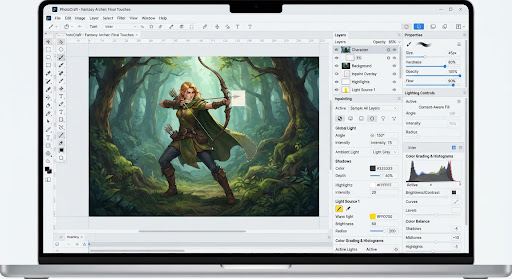
PhotoCraft
Layer-based raster image generation, smart object inpainting, generative fill, and high-fidelity 4K/8K real-time upscaling with precision brush controls.
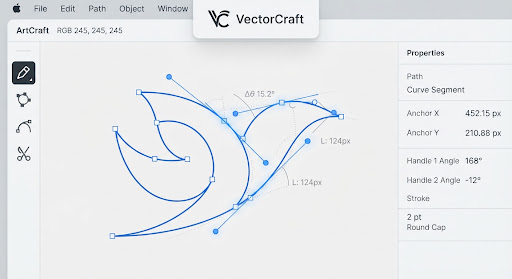
VectorCraft
Direct AI prompt-to-SVG generation with automated Bézier path simplification, infinite scalability, and professional logo export ready for print or web.
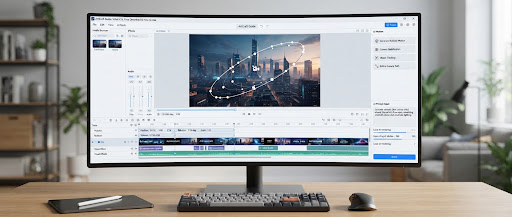
Motion Studio
Animate static stills with camera panning trajectories, 60fps optical flow frame interpolation, and consistent character video generation.
ArtCraft vs. Adobe Creative Cloud
Understanding the architectural differences between localized, ownership-driven creative software and cloud-locked monthly subscriptions.
| EVALUATION METRIC | ARTCRAFT (DESKTOP) | ADOBE PHOTOSHOP & PREMIERE | PARITY VERDICT |
|---|---|---|---|
Cost & Licensing | $0.00 Forever (Free & Open Source)No credit cards, zero recurring charges | $59.99 / Month ($719.88/year)Requires ongoing active subscription | 100% UNRESTRICTED |
Generative AI Limits | Unlimited Local GenerationsBatch render 1,000+ variants at zero cost | Monthly "Generative Credit" QuotasThrottled speeds after monthly quota consumed | ARTCRAFT ADVANTAGE |
Privacy & Data Ownership | 100% Air-Gapped Offline ExecutionArtworks never touch third-party servers | Mandatory Cloud Sync & TelemetryTerms of Service subject to cloud analysis | MAXIMUM PRIVACY |
Workstation Demands | Requires 8GB+ GPU / 16GB MacRuns entirely on consumer workstation silicon | Runs on lightweight laptopsAI offloaded to remote server clusters | ADOBE ACCESSIBILITY |
Complex Print Prep & CMYK | Experimental CMYK / High-res SVGVectorCraft handles SVGs; print pipeline in dev | 30+ Years of Print Industry StandardsDeep Pantone, prepress, spot channel support | ADOBE MATURITY |
Frequently Answered Questions
Straight answers to common questions about licensing terms, safe binary installations, and hardware trade-offs.
The ArtCraft community maintains an active Discord server and GitHub Discussions board with 14,000+ members.
Join Community DiscussionsIs ArtCraft really 100% free for commercial work?
Yes. The ArtCraft application code is distributed under permissive open-source licenses (GPLv3 / MIT core). You own 100% of the artworks, vectors, animations, and video files rendered on your workstation. There are no royalties, seat fees, or monetization restrictions on commercial assets produced with it.
Where do I download official builds safely?
Always download ArtCraft binary releases exclusively through the verified Official GitHub Releases page or the primary upstream project portal at getartcraft.com. Beware of unofficial repackaged mirror sites that inject third-party ad wrappers. Our Download Guide tracks verifiable SHA-256 cryptographic checksums for every build.
How does ArtCraft compare to ComfyUI and AUTOMATIC1111?
While ComfyUI is unmatched for technical node-graph experimentation, its spaghetti connections are notoriously difficult for traditional designers. ArtCraft packages similar underlying diffusion capabilities into a familiar, layer-based creative workspace reminiscent of Photoshop and Figma. You get the raw speed of open weights with the tactile comfort of brushes, layers, and transform gizmos.
Can I run ArtCraft on a MacBook without an external GPU?
Yes! Apple Silicon Macs (M1, M2, M3, M4) feature high-bandwidth Unified Memory architecture. ArtCraft includes first-class Apple Metal Performance Shaders (MPS) optimizations. A Mac with 16GB or 24GB Unified Memory handles standard SDXL and PhotoCraft generations in 3–6 seconds without thermal throttling.
Comprehensive Learning Tracks
Absolute Beginner: First Installation & Prompting
Step-by-step guidance on setting up CUDA/Metal acceleration, downloading base checkpoints, and composing high-coherence image prompts.
Advanced PhotoCraft: Inpainting & Realistic Relighting
Master the brush mask feathering pipeline, replace background environments while preserving subject lighting reflections, and upscale to 8K.
VectorCraft: Commercial Logo Generation to Clean SVG
Convert raw conceptual diffusion drafts into crisp, mathematically simplified SVG paths ready for Figma, web delivery, or vinyl cutting.
ArtCraft Guide is an open, independent community documentation project. This website is not published, endorsed, or affiliated with Brandon Thomas, getartcraft.com, or Adobe Inc. "Photoshop" and "Illustrator" are registered trademarks of Adobe Inc. All project code is covered by respective open-source licenses.