PhotoCraft: Professional Layered AI Inpainting & Retouching
PhotoCraft brings the ergonomic workflow of Adobe Photoshop to open-source diffusion models. Seamlessly blend generative brush strokes into high-resolution multi-layer canvases directly on your desktop.
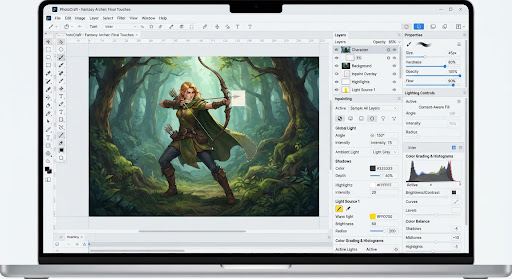
Built for Tactile Retouching, Not Just Text Prompts
Most AI tools force you to start from scratch with a text box. PhotoCraft lets you import existing client photographs, select areas with precision lasso tools, and replace backgrounds with accurate perspective and lighting.
Non-Destructive Layered Inpainting
Paint masks directly onto specific raster layers. ArtCraft only processes the masked region while preserving pixels, alpha transparency, and adjacent textures.
Relight Studio (Ambient & Directional)
Change the lighting environment of a subject post-generation. Adjust warm sun angles, moody backlight rims, or neon reflections without regenerating the core composition.
High-Res Tile Upscaler (Up to 8K)
Seamlessly upscale artworks to print-grade 8K resolutions using tiled diffusion pipelines that eliminate tiling seam lines and hallucinated blur.
Local LoRA Style Injection
Mount custom fine-tuned LoRA checkpoints locally. Blend multiple stylistic weights in real-time with granular layer sliders.
Explore PhotoCraft Tutorials
Learn how to execute brush mask inpainting and realistic relighting step-by-step.